E Challan Safe City Complete Guide to Checking and Understanding Your Traffic Challan
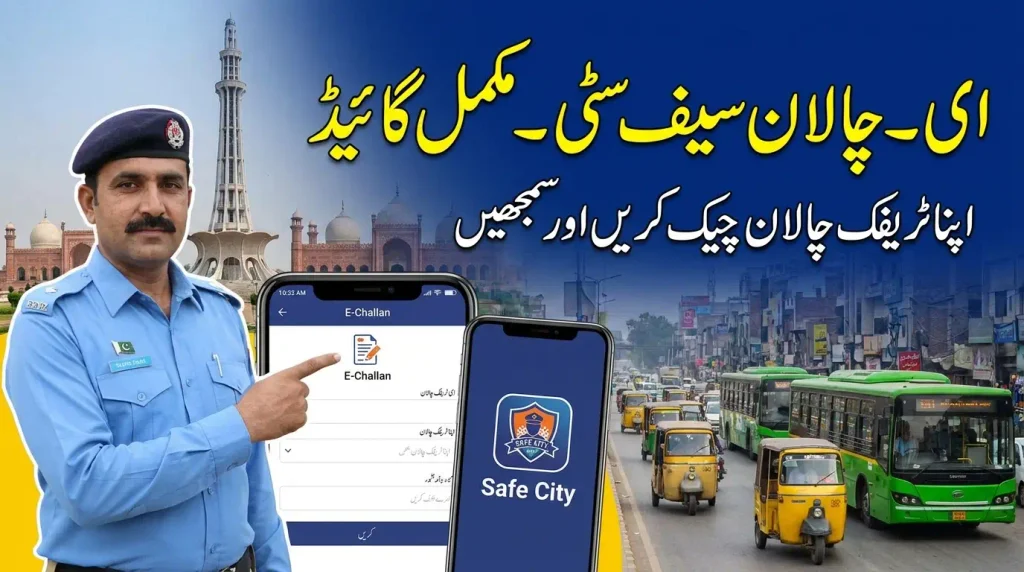
E Challan Safe City is a digital traffic enforcement system used by the Punjab Safe Cities Authority (PSCA) to detect certain traffic violations and issue electronic challans. Instead of relying only on a traffic officer stopping a vehicle on the road, Safe City technology can use cameras, traffic monitoring systems, automatic number plate recognition and artificial intelligence-based detection to identify violations. The resulting e-challan can then be associated with the vehicle and made available for verification through the official PSCA system.
For vehicle owners, the important part is knowing how the system works, what information is required when checking a challan, and how to distinguish an official e-challan record from an unverified message. PSCA provides an e-challan verification facility, while its Public Safety App also includes features for checking, downloading and managing e-challans.
This guide explains E Challan Safe City in simple terms, including how electronic traffic violations are detected, how to check a record, what information may be required, why a challan may not appear immediately, and what vehicle owners should consider after finding an e-challan.
What Is E Challan Safe City?
Understanding the Safe City E-Challan System
E Challan Safe City refers to the electronic traffic enforcement process operated through the Punjab Safe Cities Authority. PSCA describes its e-challan system as an AI-powered system that uses surveillance technology to detect traffic violations and issue electronic tickets. The system forms part of the broader intelligent traffic management infrastructure used for monitoring and enforcement.
An electronic challan is different from a traditional paper ticket because the violation and related vehicle information are recorded digitally. Depending on the type of violation and the system involved, cameras and traffic monitoring technology can capture information that supports enforcement. The record can then be checked through the available PSCA e-challan verification service.
Why Safe City E-Challans Matter to Vehicle Owners
A vehicle owner may not always be stopped by a traffic officer when a violation occurs. Automated traffic monitoring can identify particular violations through cameras and related systems. This makes it useful for owners to understand how to verify their vehicle records rather than assuming that no ticket exists simply because they did not receive a paper challan at the roadside.
Regular verification can also help a vehicle owner identify outstanding traffic records and understand what action may be required. It is particularly useful when a vehicle is used by more than one person, because the registered vehicle owner may need to keep track of traffic records associated with the vehicle.
How to Check E Challan Safe City
Check Through the Official PSCA E-Challan Service
The official PSCA e-challan verification service provides a direct way to search for an e-challan record. The current verification interface asks for the vehicle plate number along with either the CNIC or chassis number. Entering the requested information carefully is important because the system uses these details to identify the relevant vehicle record.
Start by using the official PSCA e-challan verification facility rather than an unfamiliar website that claims to provide the same service. Enter the plate number in the format requested by the system. Then provide the CNIC or chassis number requested on the verification page and submit the search. If a matching record is available, the system can display the relevant e-challan information.
Check E-Challans Through the PSCA Public Safety App
The PSCA Public Safety App also includes e-challan services. According to the Punjab Safe Cities Authority, the app allows citizens to check, download and manage their e-challans. This gives users another official digital option for accessing their traffic records from a mobile device.
When using the app, make sure you are using the official PSCA application and that the information entered belongs to the vehicle you want to check. Keeping the app updated can also help ensure that you are using the current version of the available service. Avoid entering CNIC, vehicle or other personal information into unofficial applications that merely claim to provide Safe City challan checking.
Information You May Need for Verification
The current PSCA e-challan search interface asks for two categories of information: the vehicle plate number and an identifying detail in the form of a CNIC or chassis number. The plate number should be entered exactly as required by the search field. The second detail should also be entered carefully because an incorrect number can prevent the system from finding the intended record.
If you are checking a vehicle registered in your name, keep the relevant vehicle documents available before beginning the search. This makes it easier to confirm the registration information and avoid repeated attempts caused by typing errors. For a company, leased or otherwise specially registered vehicle, the relevant identifying information may need to be checked against the vehicle record before searching.
How Safe City Detects Traffic Violations
Camera and Number Plate Recognition
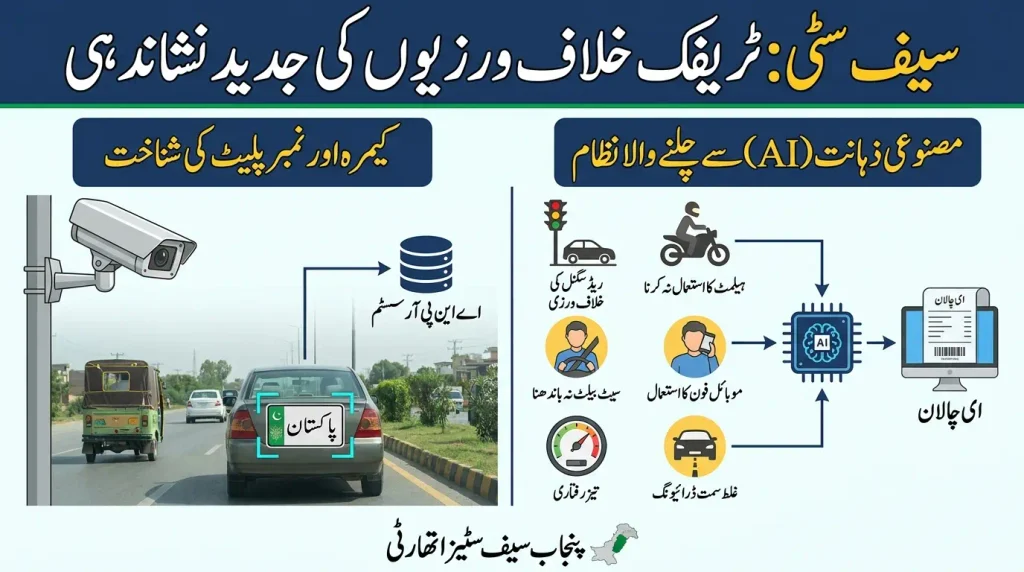
Safe City traffic enforcement relies on technology that can monitor roads and identify vehicles and traffic activity. PSCA describes its traffic management infrastructure as including systems such as Automatic Number Plate Recognition and Red Light Monitoring. These systems help connect traffic observations with vehicle information so that an electronic traffic record can be created when the relevant conditions for enforcement are met.
Automatic number plate recognition is particularly important because the system needs to identify the vehicle involved in a detected violation. The number plate captured by the traffic monitoring equipment can be used as part of the electronic record. This reduces the need for a traffic officer to manually write down the vehicle number at the location of every camera-detected violation.
AI-Based Traffic Violation Detection
PSCA has also described an AI E challan system that uses computer vision to identify different types of traffic violations. Its published information explains that some violations can be detected from individual image frames, while others require analysis of vehicle movement over time. Examples described by PSCA include helmet use, seatbelt use, mobile phone use, speeding, red-signal violations and wrong-way driving.
The purpose of using AI in this process is to automate the identification of traffic violations within the monitored environment. It does not mean that every traffic situation on every road is automatically converted into a challan. The system operates through its available traffic monitoring infrastructure and the violation-detection capabilities deployed by the authority.
Examples of Violations Detected by Traffic Systems
PSCA’s published traffic management information identifies several violations that can be monitored through its systems. These include red-light or traffic-signal violations, wrong-lane or wrong-turn violations, one-way violations, and line, lane or zebra-crossing violations. The AI-powered system has also been described as capable of identifying other violations through image and movement analysis.
The exact technology used can depend on the type of violation being detected. A red-light violation, for example, involves understanding the position and movement of a vehicle in relation to a traffic signal. A helmet or seatbelt-related violation can be approached differently because the relevant information can be identified from the vehicle or rider image. This is why Safe City enforcement is more than a simple camera photograph.
What Information Can an E-Challan Show?
Vehicle and Violation Details
An e-challan record is intended to connect a traffic violation with the vehicle involved. Depending on the available record and interface, users may see information relating to the vehicle, the violation and the status of the ticket. The most useful first step is to compare the displayed vehicle information with the vehicle you actually own or operate.
If the record relates to an unfamiliar vehicle, do not immediately assume that the challan belongs to you. Check the registration details carefully. A typing error during a manual search can also produce confusion, especially when letters and numbers in a vehicle registration are similar. Always review the information shown by the official system before taking any further action.
Ticket Status and Outstanding Records
One of the main reasons people check an e-challan is to determine whether there is an outstanding traffic record associated with their vehicle. The official verification system is intended to provide access to the available e-challan information so that vehicle owners can understand their current records instead of relying on an old paper notice or an unverified message.
If an outstanding record appears, read the available information carefully before deciding what to do next. Keep a record of the relevant ticket details for your own reference. If the system provides an official option for managing or downloading the e-challan, use the facility provided by PSCA rather than relying on screenshots or information copied from an unofficial source.
What If Your E-Challan Is Not Showing?
Check the Plate Number and Identifying Information
The first thing to check is whether the vehicle plate number, CNIC or chassis number was entered correctly. The current PSCA verification service specifically requires the plate number and either the CNIC or chassis number. Even a small typing error can prevent a matching record from being found.
Compare the information you entered with the vehicle documents and try the search again. Pay attention to the exact plate format requested by the verification system. If the information is correct and the record still does not appear, the issue may not necessarily mean that the system is wrong. It may simply mean that there is no matching record available through that search at the time.
A Recently Detected Violation May Need Processing
A traffic violation does not necessarily become visible to a citizen at the exact moment it occurs. Camera-based enforcement involves detection, identification and electronic record processing. For that reason, a very recent incident may not immediately appear during a search. Avoid assuming that a missing record proves that no violation was recorded.
If you believe a violation should be visible but cannot find it, check the official service again later and make sure that the vehicle information remains correct. Where the official system provides a support or complaint facility, use that channel for a record-specific question rather than relying on unofficial social media pages or third-party websites.
Internet, App or System Problems
A temporary internet connection problem can also interfere with an online search. If the page does not load correctly, try again after checking the internet connection. For mobile users, make sure the official Public Safety App is functioning normally and that the latest available version is being used.
If the problem continues, avoid entering the same personal information into several unrelated websites simply because they claim to provide an e-challan search. Use the official PSCA channels and the information they request. This is especially important because CNIC, chassis and vehicle information can be sensitive personal or vehicle-related data.
How to Stay Safe When Checking an E-Challan
Use Official PSCA Channels
One of the most important precautions is to use the official PSCA e-challan verification facility or the official PSCA Public Safety App. Search engines and social media can contain pages that look similar to government services, but appearance alone does not establish that a page is official.
When a service asks for identifying information such as a CNIC, chassis number or vehicle registration, verify that you are using the genuine PSCA service before entering anything. Be particularly careful with messages that create unnecessary urgency or ask you to provide financial information through an unfamiliar page.
Be Careful With E-Challan Messages and Payment Requests
An e-challan message should not automatically be treated as proof that a payment is required. If you receive an SMS or message claiming that you have an outstanding traffic fine, verify the record through the official PSCA system before taking action. Do not share passwords, banking credentials, card information or other sensitive details with an unknown sender merely because the message mentions an e-challan.
If payment is required, follow the payment method currently provided through the relevant official government service. Keep your transaction information after a legitimate payment for future reference.
E Challan for Vehicle Owners
Why Regular Checking Can Be Useful
Traffic violations can be associated with a vehicle even when the registered owner was not personally driving at the time. Families may share cars, businesses may have several drivers, and vehicles may be used by employees or other authorized people. Regularly checking the available record can therefore help the registered owner stay aware of the vehicle’s traffic status.
Checking is also useful when a vehicle has changed hands or when ownership records and actual use do not match. If you have recently bought a used vehicle, make sure the vehicle information and ownership documentation are properly understood before assuming that an old traffic record belongs to you personally. The official record should be reviewed carefully.
Checking Before Buying or Selling a Vehicle
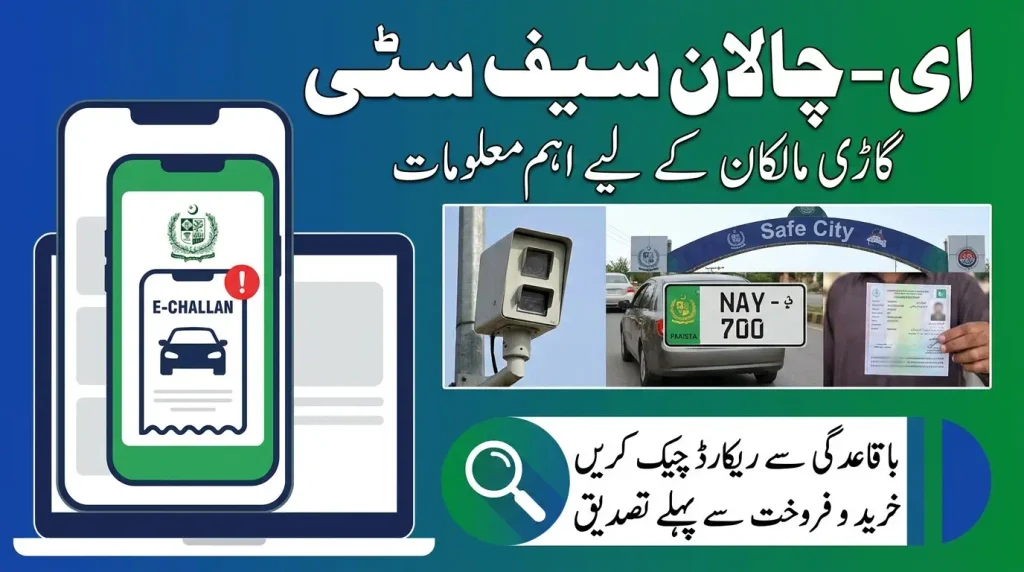
Vehicle transactions are another situation in which electronic traffic records can become relevant. A buyer may want to understand the vehicle’s available traffic information, while a seller should keep proper ownership and transaction records. An e-challan is a traffic enforcement record, so it should not be confused with the vehicle’s complete ownership history or every legal issue that may relate to a vehicle.
Before completing a vehicle transaction, check the available documentation and make sure the vehicle registration information is consistent. If an e-challan is shown, review the details instead of relying only on a verbal statement from another person. Keeping copies of relevant documents can make later clarification easier if a record needs to be discussed with the appropriate authority.
What to Do After Finding an E-Challan
Review the Record Carefully
Do not rush after seeing an e-challan. First review the vehicle information, violation information and other details available in the official record. Make sure the registration number corresponds to your vehicle and that the record is not the result of an incorrect search.
If another person was driving the vehicle, the registered owner should still understand what the record relates to. Keep the ticket information available until the matter has been properly dealt with. If there is a question about the record, use the official process available through the relevant authority instead of attempting to resolve the issue through an unofficial intermediary.
Keep a Record of Important Details
If the e-challan system provides an option to download or save the record, keeping a copy can be useful. A saved record can help when discussing a ticket with the relevant authority, reviewing payment information, or comparing the status later. Do not rely only on a forwarded screenshot because screenshots can be altered or may not contain all the information available in the official record.
For the same reason, keep payment evidence when an official payment has been completed. The purpose is not to create unnecessary paperwork but to have a clear reference if the status shown online does not immediately match the transaction information you have retained.
Frequently Asked Questions About E Challan Safe City
Final Thoughts
E Challan Safe City has changed the way many traffic violations can be monitored and recorded. Through camera-based traffic systems, automatic number plate recognition and AI-powered detection, the Punjab Safe Cities Authority can identify certain violations and create electronic traffic records without requiring an officer to stop every vehicle at the roadside.
For vehicle owners, the practical step is straightforward: use the official PSCA e-challan verification facility or Public Safety App, enter the vehicle information carefully, and review the record shown by the system. If a record appears, check its details before taking further action. If nothing appears, confirm the search information and consider whether the violation may be too recent to have completed processing.
Most importantly, do not depend on an unfamiliar message, social media post or third-party website to confirm a traffic fine. The official PSCA system remains the appropriate place to verify an e-challan record and understand the information associated with your vehicle.