
Online Tax Payment 2026: 7 Easy Steps to Pay Taxes Online in Pakistan
Online tax payment has made the process of paying applicable taxes easier for many taxpayers in Pakistan. Instead of depending completely on a physical bank visit, eligible taxpayers can prepare their payment through the digital tax system and use supported banking channels to complete the transaction. The process is especially useful for people who already use internet banking, mobile banking or other digital banking services and want to manage their tax payments from a convenient location.

https://echallanchecker.online/ is here to provide you all information. For many people, the most confusing part of online tax payment is understanding the complete process. A taxpayer may know that tax can be paid online but may still be unsure about PSID, the correct tax category, payment methods, payment confirmation and CPR. This guide explains the process in simple language and covers the important steps that should be followed before, during and after making a tax payment through the available digital system.
What Is Online Tax Payment in Pakistan?
Understanding the digital tax payment process
Online tax payment refers to paying an applicable tax through an electronic payment system instead of relying only on a traditional counter transaction. In Pakistan, FBR provides digital facilities for different tax-related payments through its online system. Depending on the payment type, the taxpayer may enter the required information, generate a Payment Slip ID, choose an available payment method and complete the transaction through a supported banking channel. The process is designed to connect the payment with the taxpayer’s relevant tax record.
Why online tax payment is useful
The main benefit of online tax payment is convenience. A taxpayer can prepare the payment information digitally and use a supported payment channel without making the entire process dependent on a physical visit to a bank. It can also make record keeping easier because payment information, PSID details and the final receipt can be retained electronically. However, convenience does not mean that the payment should be rushed. The taxpayer still needs to select the correct tax type, enter accurate information and verify the payment after completion.
How to Start Online Tax Payment
Prepare the required tax information
Before starting an online tax payment, the taxpayer should first understand what amount needs to be paid and why it is due. Depending on the payment, the system may require information such as CNIC, NTN, registration number, tax year, tax period, payment category or other relevant particulars. Having the correct information available makes the process easier and reduces the chance of entering incorrect details. If the payment is connected with a return, notice or other tax record, that information should be reviewed before beginning the payment process.
Use the correct official payment system
The payment should be prepared through the applicable official tax system. For FBR-related payments, IRIS provides e-payment facilities covering several tax categories. The current IRIS 2.0 payment environment includes options for income tax, sales tax, withholding and other listed payments. Using the correct system is important because unofficial websites or old instructions may show information that does not match the current process. Taxpayers should therefore check the current government system before entering personal or financial information.
How to Generate a PSID for Online Tax Payment
Select the relevant payment category
A PSID, or Payment Slip ID, connects the payment information prepared in the tax system with the actual payment transaction. The taxpayer should first select the tax category that matches the liability being paid. FBR’s current e-payment system provides several categories, so it is important not to select an option simply because its name looks familiar. The correct selection depends on the nature of the tax payment. After selecting the appropriate category, the taxpayer can enter the requested particulars and proceed with the payment creation process.
Review the amount before creating the PSID
The amount should always be checked before a payment slip is created. The taxpayer should compare the amount being entered with the actual amount due according to the relevant tax information. If the payment relates to a specific tax year or period, that detail should also be checked carefully. A mistake at this stage can make later reconciliation more difficult. Once the taxpayer has reviewed the tax category, taxpayer details, period and amount, the payment information can be confirmed and the PSID can be generated through the applicable payment process.
Online Tax Payment Methods in Pakistan
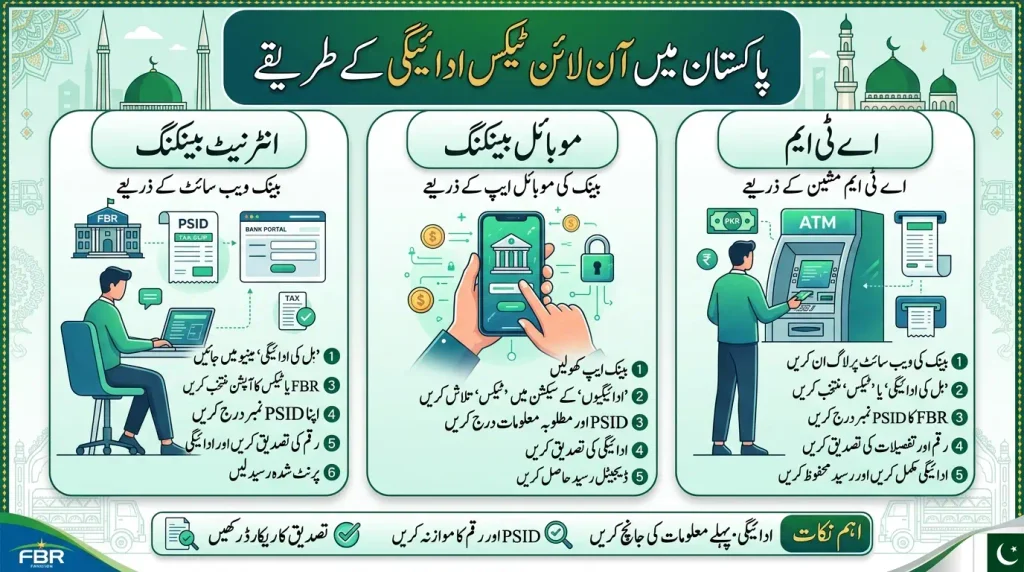
Internet banking for tax payments
Internet banking is one of the payment channels available for eligible tax payments. After the taxpayer has generated the required payment information, the relevant bank service can be used to complete the transaction. The exact menu names and screens can differ between banks, so taxpayers should follow the current instructions provided by their own banking service. Before authorizing the transaction, the PSID and amount should be compared with the payment information already prepared. A confirmation should then be retained for future reference.
ATM and mobile banking options
FBR lists ATMs and mobile banking among the alternate delivery channels available for applicable tax payments. These options can be useful for taxpayers who prefer not to visit a bank branch. The availability and exact procedure can depend on the banking service and payment type. A taxpayer should therefore confirm that the selected channel supports the intended payment before starting the transaction. The PSID should be entered carefully, and the amount shown during the confirmation stage should be compared with the expected tax payment before approval.
How to Pay Income Tax Online
Choose the correct income tax payment
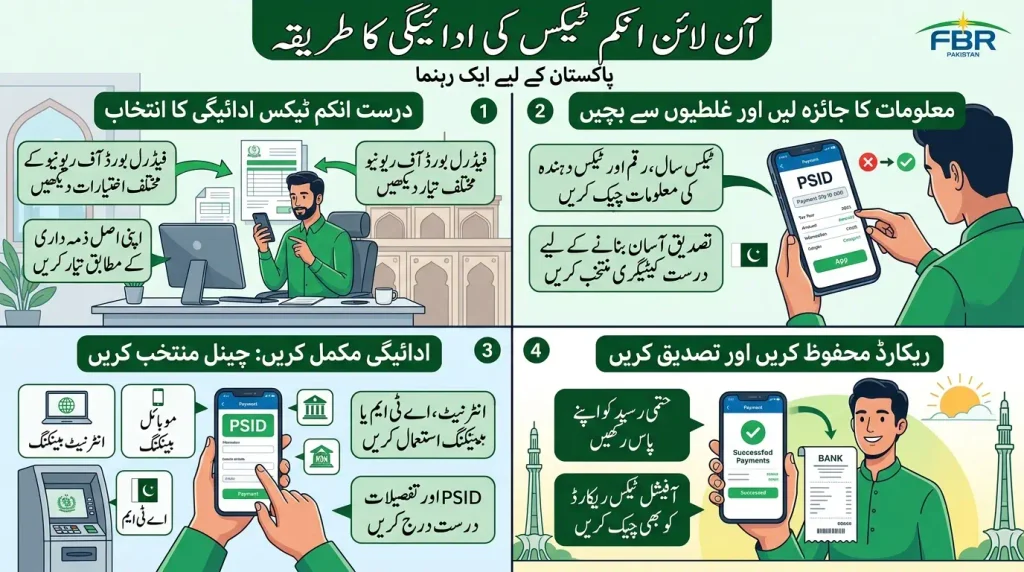
Income tax payments should be prepared according to the actual liability being paid. The current FBR system provides different payment options, so a taxpayer should first identify the relevant type of income tax payment. The applicable tax year, amount and taxpayer information should be reviewed before the payment is created. This is particularly important when a taxpayer has more than one tax-related obligation. Selecting the correct payment category helps the transaction remain connected with the intended tax record and makes the later verification process easier.
Complete payment using the selected channel
After the income tax payment information has been prepared, the taxpayer can use the applicable payment channel. If the payment is made through internet banking, ATM or mobile banking, the PSID and other requested details should be entered exactly as provided. The confirmation screen should be reviewed before authorization. A successful deduction from a bank account is useful evidence of the transaction, but taxpayers should also check the official tax payment record and retain the final receipt or confirmation for their records.
How to Pay Sales Tax Online
Prepare the sales tax payment information
Sales tax payment is another area where taxpayers can use the digital payment facilities provided by FBR. The taxpayer should first identify the relevant sales tax obligation and enter the required information accurately. Details such as registration information, payment category, period and amount should be checked before the payment is confirmed. Because sales tax compliance can involve business records and periodic obligations, it is useful to keep the payment confirmation together with the relevant accounting and tax documents after the transaction has been completed.
Check the payment record after completion
After completing sales tax payment, the taxpayer should retain the transaction information and check the official payment record when available. This provides a second level of confirmation beyond the bank transaction itself. If the taxpayer is responsible for business accounts, the PSID, transaction reference and final receipt should be stored with the relevant tax period. Keeping these records organized can help when the business reviews previous payments or needs to confirm whether a particular amount was already paid.
What Is a CPR in Online Tax Payment?
Understanding the Computerized Payment Receipt
CPR stands for Computerized Payment Receipt and is an important record associated with a completed tax payment. The receipt provides confirmation of the payment record after the transaction has been processed. For taxpayers, the CPR is valuable because it gives them a record that can be retained with their other tax documents. It is better to keep the official payment record instead of depending only on a bank SMS or temporary notification, because the official tax record contains the information needed to identify the payment within the tax system.
Why the CPR should be saved
A CPR can be useful when a taxpayer needs to confirm a previous payment, review tax records or resolve a question about a transaction. Saving the receipt creates a clear record of what was paid and connects the payment with the relevant tax information. For businesses, CPR records can be stored according to the tax period and accounting records. Individuals can also keep digital copies in a secure location. Good record keeping becomes particularly useful when several tax payments are made during the year and the taxpayer needs to identify a particular transaction later.
How to Check Online Tax Payment Status
Check PSID and CPR information
Checking the payment status is an important part of online tax payment. FBR’s current IRIS 2.0 system provides online verification facilities for PSID and CPR information. This allows taxpayers to check payment-related details rather than depending only on a bank transaction message. When checking a payment, the taxpayer should use the information associated with the original transaction. The PSID, payment amount and other available details should be kept nearby so that the correct record can be identified without confusion.
Allow time for processing
A payment made through a bank should not always be judged only by what appears immediately on the tax portal. Processing and record updating can take time depending on the payment process. If the bank account has been debited but the tax record is not immediately visible, the taxpayer should keep the transaction reference, PSID, amount and date. Making another payment immediately can create a duplicate transaction. It is better to check the payment status through the appropriate official facility and follow the applicable support process if the record remains unresolved.
Online Tax Payment Through Mobile Banking
Prepare the PSID before opening the banking app
Mobile banking can be a convenient option when the taxpayer’s bank supports the applicable tax payment. Before opening the banking application, it is useful to have the PSID and expected payment amount available. This makes it easier to enter the information accurately and compare the final confirmation screen. The taxpayer should use the official banking application and complete the authentication personally. Banking passwords, PINs and one-time authentication codes should never be shared with another person who claims to be helping with the tax payment.
Confirm the payment before authorization
After selecting the tax payment option in a mobile banking application, the taxpayer should check the PSID and amount shown before authorizing the transaction. If the displayed information is different from what was expected, the transaction should not be approved until the difference is understood. Once the payment is completed, the bank confirmation should be saved. The taxpayer should then check the relevant tax payment record and retain the CPR or other official confirmation when it becomes available.
Common Problems With Online Tax Payment
PSID is rejected or not accepted
If a PSID is not accepted during the payment process, the taxpayer should first check whether the number was entered correctly. The taxpayer should also review whether the selected payment channel supports the intended transaction and whether the payment information is still valid. Randomly entering the number repeatedly is not a good solution. The original payment record should be checked carefully, and the taxpayer should use the applicable official support or banking channel if the problem continues. Keeping the original payment details makes troubleshooting much easier.
Bank account is debited but record is missing
A taxpayer may sometimes see that money has been deducted from a bank account while the tax payment record is not immediately visible. In this situation, the bank transaction reference, PSID, date and amount should be saved. The taxpayer should check the relevant payment verification facility and allow the applicable processing time. Making another payment before checking the original transaction can result in a duplicate payment. If the issue continues, the taxpayer can use the appropriate bank and tax authority support channels with the complete transaction information available.
Important Safety Tips for Online Tax Payment
Use official websites and banking apps
Taxpayers should use the official FBR system and the official banking service when making an online tax payment. Search results, forwarded messages and social media posts can contain old information or misleading payment instructions. A taxpayer should never enter sensitive banking information on a website simply because it uses tax-related words in its name. The safest approach is to start from the official tax system and then move to the official payment channel supported by the taxpayer’s bank. This also helps ensure that the payment process matches the current procedure.
Never share passwords or OTP codes
Online tax payment may require authentication through a bank, but taxpayers should complete that authentication themselves. Banking passwords, PINs, one-time passwords and other confidential security information should not be shared with another person. A legitimate payment process does not require a stranger to take control of a taxpayer’s banking account. If someone asks for sensitive banking information to complete a tax payment, the taxpayer should stop and verify the request through an official channel. Protecting banking credentials is just as important as entering the correct tax information.
Online Tax Payment for Individuals and Businesses
Online payment for individual taxpayers
Individual taxpayers may use online tax payment for different types of applicable income tax obligations. The correct process depends on the nature of the liability, so an individual should first identify the payment requirement and the relevant tax year or period. Personal details should be entered accurately, and the taxpayer should carefully review the amount before generating the payment information. After completing the transaction, the payment confirmation should be saved. Keeping these records organized can make future tax-related work easier and can help when a previous payment needs to be verified.
Online payment for businesses and registered taxpayers
Businesses may deal with several tax payment categories depending on their activities and registration status. A business should identify the exact liability before generating the payment information and should maintain a consistent record of PSIDs, bank transaction references and CPRs. If more than one payment is being handled, each transaction should be checked separately rather than treating all payments as one amount. Maintaining organized records helps businesses match payments with their tax periods and accounting records and makes later verification easier.
Online Tax Payment and Tax Deadlines
Do not wait until the final day
Although online tax payment can be completed digitally, taxpayers should avoid leaving the process until the last possible moment. A payment may involve preparing information, creating a PSID, accessing a banking service, completing authentication and checking the final payment record. Technical issues or banking service interruptions can also create delays. Starting earlier gives the taxpayer time to correct an information error or investigate a payment problem without unnecessary pressure. The applicable deadline should always be checked according to the specific tax obligation rather than relying on an old date found online.
Filing and payment are not always the same thing
A taxpayer should also understand the difference between filing a tax return and paying a tax liability. The two activities can be connected but they are not automatically identical. A person may have to submit a return and separately pay the applicable amount. Completing an online tax payment does not necessarily mean that every other filing or declaration requirement has been completed. Taxpayers should therefore review the requirements connected with their specific tax obligation and ensure that both payment and any separate filing responsibilities are handled where required.
7 Steps for a Smooth Online Tax Payment
Prepare, verify, pay and confirm
A simple routine can make online tax payment easier to manage. First, identify the exact tax liability. Second, prepare the required taxpayer information. Third, open the applicable official payment facility. Fourth, select the correct tax category and enter the amount. Fifth, generate the PSID where required. Sixth, complete the transaction through a supported payment channel such as internet banking, ATM or mobile banking. Seventh, save the transaction confirmation and check the final payment record. Following the same routine each time can reduce confusion and make payment records easier to organize.
Keep every important payment record
The final stage of online tax payment is record keeping. A taxpayer should retain the PSID, bank transaction reference, payment date, amount and CPR or other official confirmation when available. These records can be stored digitally with the relevant tax documents. If a payment later needs to be checked, the taxpayer will have enough information to identify the transaction. For businesses, the records can be organized according to tax period and accounting records. For individuals, a secure digital folder can be used to keep payment confirmations together.
Final Checklist Before Online Tax Payment
Check taxpayer details and payment amount
Before completing the payment, check the taxpayer identification information, selected tax category, tax year or period and amount. If a PSID is displayed, compare it with the payment information that was prepared in the tax system. The final confirmation screen should be treated as an important review point rather than something to click through quickly. Correct information at this stage helps reduce payment-related mistakes and makes the transaction easier to reconcile with the taxpayer’s records after completion.
Save the confirmation after payment
After the transaction is completed, save the bank confirmation and the official tax payment record. If a CPR is generated, retain it with the relevant tax documents. Do not rely only on memory or a temporary bank notification. A proper record should allow the taxpayer to identify the amount, date, payment reference and related tax obligation later. This final step is simple but important because a well-organized payment record can make future verification much easier.
Online Tax Payment FAQs
Final Thoughts on Online Tax Payment
Online tax payment has made the process of paying taxes more convenient by reducing the need for repeated visits to a bank or tax office. With the current digital payment process, taxpayers can create the required payment information, generate a PSID, use an available banking channel, and keep confirmation records for future reference. The most important part is to enter the correct taxpayer and payment details before completing the transaction.
For taxpayers using FBR services, understanding the relationship between IRIS, PSID, banking channels, and the Computerized Payment Receipt can make the entire process easier to manage. Whether the payment relates to income tax, sales tax, federal excise duty, withholding tax, or another applicable liability, careful checking before payment can help prevent avoidable errors. After making an online tax payment, taxpayers should also confirm the transaction status and keep the payment evidence safely.
The best approach is to treat online tax payment as a step-by-step process rather than simply transferring an amount and assuming everything is complete. Check the tax category, tax period, amount, payment details, and PSID before authorizing the transaction. Once the payment is completed, retain the confirmation and CPR records where applicable. This simple habit can make future tax filing, verification, accounting, and record keeping much easier.
Online tax payment is especially useful when combined with good record keeping. Keep digital copies of payment confirmations, PSIDs, CPRs, and relevant tax documents in an organized location. If a payment does not appear as expected, avoid making another payment immediately without checking the original transaction status. Reviewing the available payment information first can help prevent duplicate payments and unnecessary confusion.
Finally, always use the official tax and banking channels available to you and protect your login credentials, passwords, PINs, and one-time verification codes. Tax payment requirements can differ according to the type of tax and the taxpayer’s circumstances, so the applicable information should be checked before payment. When these basic precautions are followed, online tax payment can become a much more manageable part of regular tax compliance.