
Sindh Excise Online Verification Tax Payment & Services 2026
Sindh Excise provides a range of motor vehicle and tax-related services for vehicle owners across Sindh. The department has expanded its digital services so that many common tasks can be started or completed online, including vehicle verification, motor vehicle tax payment, Quick Pay, tax calculation, number plate services and access to mobile applications. For vehicle owners, knowing how these services work can save time and make routine vehicle-related tasks easier to manage.
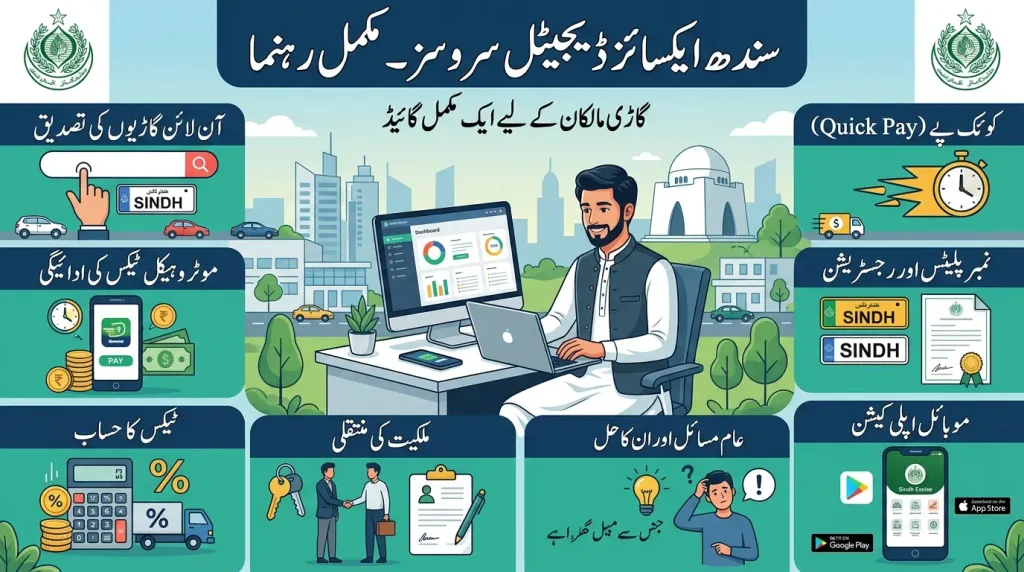
This complete guide explains the main Sindh Excise services in simple language. It covers online vehicle verification, motor vehicle tax payment, PSID generation, Quick Pay, payment methods, tax records, registration, ownership transfer, number plates, tax calculation and common problems. The purpose is to help vehicle owners understand the process before they enter their information or make a payment.
What Is Sindh Excise?
Understanding the department
Sindh Excise refers to the Excise, Taxation and Narcotics Control Department of the Government of Sindh. For vehicle owners, one of its most relevant areas is motor vehicle registration and taxation. The department maintains computerized vehicle records and provides services connected with registration, taxation, ownership transfer and vehicle identification. These services are relevant to private vehicles, motorcycles, commercial vehicles and other categories covered by the applicable rules.
Why Sindh Excise services matter to vehicle owners
Vehicle owners regularly need accurate information about registration, tax status and ownership records. An online service can make it easier to check information before visiting a department office or completing a transaction. It can also help owners keep payment records and verify vehicle details. However, online information should always be entered carefully because registration numbers, mobile numbers and other details need to match the information required by the relevant service.
Sindh Excise Online Services
Main digital services
The online services offered through Sindh Excise include several useful options for citizens. The current online services section includes online tax payment, Quick Online Tax Payment, online vehicle verification, vehicle verification by CNIC, number plate checking, an online tax calculator and access to mobile applications. Having these services in one digital environment makes it easier for vehicle owners to find the particular service they need instead of treating every vehicle-related task as a separate office visit.
Choosing the correct online service
The correct service depends on what you need to do. If you only want to confirm a vehicle record, use the vehicle verification option. If you need to pay motor vehicle tax, use the relevant tax payment service. Quick Pay is designed for a faster payment process without requiring the same account-registration process used by the regular online payment route. A tax calculator can help estimate applicable charges, while number plate services address specific plate-related requirements.
Sindh Excise Online Vehicle Verification
How vehicle verification works
Sindh Excise vehicle verification allows users to check a vehicle record through the official online motor vehicle record service. The current verification service asks the user to select the vehicle category and enter the registration number. The available categories include four-wheelers and two-wheelers. The registration number should be entered exactly as it appears on the vehicle number plate so that the system can process the search correctly.
What to check before searching
Before starting an online vehicle verification, check the registration number carefully. A misplaced letter, missing character or incorrect format can prevent the correct record from appearing. It is also useful to distinguish between a two-wheeler and a four-wheeler before submitting the search. If the information does not appear, recheck the registration details instead of immediately assuming that the vehicle has no record.
Sindh Excise Online Tax Payment
Preparing for online tax payment
Sindh Excise online tax payment is available for motor vehicle tax through the department’s digital payment services. Before beginning, keep the vehicle registration number and a working mobile number available. The system can retrieve the relevant vehicle details and calculate applicable tax information. Reviewing the displayed information before generating a payment reference is important because the payment should relate to the correct vehicle and tax information.
Checking the calculated tax amount
After the vehicle information is entered, the payment service can display current tax and any applicable arrears or related amounts. Take time to review the information before continuing. If the displayed vehicle details or amount looks different from what you expected, do not rush into payment. First check the registration information and the applicable service. The calculated amount should be reviewed before generating the PSID or authorizing a transaction.
Sindh Excise PSID Generation
What is a Sindh Excise PSID?
A PSID is a unique payment reference generated for the selected motor vehicle tax transaction. The current Sindh Excise FAQ describes the PSID as a 12-digit code. This number is important because the banking channel uses it to retrieve the payment information associated with the transaction. A taxpayer should copy the PSID carefully and use the same reference when making the payment through an available supported channel.
PSID validity and careful use
The official Sindh Excise FAQ states that a generated PSID is valid for the next 24 hours and that, when multiple PSIDs are generated for the same vehicle, the recent PSID is valid. This makes it important to avoid confusion between old and new payment references. If you generate a new PSID after creating an earlier one, keep track of the latest reference before starting the payment process.
Sindh Excise Quick Pay
How Quick Pay works
Sindh Excise Quick Pay is intended to provide a faster route for paying motor vehicle tax. The current Quick Pay service asks for the vehicle type, mobile number and registration number, along with the required security verification. After the vehicle details are retrieved, the service can calculate the applicable amount and provide the option to generate a PSID. The process is useful when a taxpayer wants to make a vehicle tax payment without going through the regular account-based route.
Quick Pay without account registration
One useful feature of Quick Pay is that the official FAQ states that users do not need to register an account for this payment route. Instead, the taxpayer can provide the requested mobile and vehicle information to obtain the payment details. This can make the process more straightforward for someone who only needs to pay motor vehicle tax. Even so, the vehicle registration number should be checked carefully before proceeding.
How to Pay Sindh Excise Motor Vehicle Tax Online
Generate the payment reference first
Start by selecting the appropriate Sindh Excise tax payment service and providing the required vehicle information. The system retrieves the relevant details and allows the applicable amount to be calculated. Once the amount has been reviewed, the payment reference can be generated. The PSID then becomes the key reference for the banking transaction. Keeping this number visible or safely copied can reduce the risk of entering an incorrect payment reference later.
Complete payment through a supported channel
After generating the PSID, the payment can be completed through a supported 1Bill-connected payment channel. The official Sindh Excise payment instructions describe options that include ATM, internet banking, mobile banking, branchless banking and over-the-counter payment. When the PSID is entered through a supported channel, the payment details can be retrieved before the taxpayer confirms the transaction. Always review the displayed information before pressing the final payment button.
Sindh Excise Payment Through Internet and Mobile Banking
Using internet banking
If your bank provides internet banking with the relevant 1Bill payment option, the PSID can be used to retrieve the payment details. The official Sindh Excise instructions describe selecting the 1Bill invoice or voucher payment option, entering the 12-digit PSID and reviewing the information fetched by the banking system. The taxpayer then enters or confirms the amount and authorizes the payment according to the bank’s normal security process.
Using mobile banking
Mobile banking follows a similar process when the bank supports the required bill-payment facility. Open the bank’s official mobile application, select the relevant 1Bill invoice or voucher option, enter the PSID and wait for the payment details to appear. Check the retrieved vehicle and payment information before confirming. The exact layout of a banking application can vary, so users should follow the current instructions displayed by their own bank.
Sindh Excise Tax Payment Through ATM
ATM payment process
The official payment instructions explain that a taxpayer can use a supported bank ATM by inserting the debit card and entering the ATM PIN. The user then selects the bill-payment area and the 1Bill invoice or voucher option before entering the 12-digit PSID. The system can retrieve the relevant payment information. After checking the displayed details, the taxpayer can confirm the payment according to the ATM instructions.
Confirming the transaction
Do not leave the ATM immediately after completing the transaction without checking whether the payment was accepted. Keep the transaction information provided by the bank and wait for the applicable confirmation. According to the Sindh Excise payment instructions, a confirmation SMS can be sent to the registered mobile number after a successful payment. The bank may also send a separate notification if its SMS service is active.
How to Check Sindh Excise Paid Tax Status
Check the payment history
After paying motor vehicle tax, taxpayers can use the available tax payment history or paid-challan option to review their transaction. The official Sindh Excise FAQ states that a paid challan can be downloaded through the relevant payment-history or print-paid-challan option. Keeping this document is useful because it provides a record of the completed transaction and can help when the taxpayer needs to review previous payments.
When the payment record does not appear
If a payment does not appear as expected, avoid immediately making another payment. First check the bank transaction, PSID, payment confirmation and available tax history. The official FAQ states that motor vehicle tax is updated in real time after a successful transaction from the consumer side. If there is a mismatch or technical issue, the taxpayer should keep the transaction evidence and use the department’s available assistance channels instead of creating unnecessary duplicate payments.
Sindh Excise Vehicle Tax Calculator
Estimating registration-related charges
The Sindh Excise tax calculator can be used to estimate certain registration-related charges before completing a vehicle transaction. The current calculator provides options for different vehicle categories, including cars and jeeps as well as motorcycles and scooters. It can be useful when a person wants to understand an estimated amount before moving ahead with registration, transfer or another applicable vehicle service.
Why calculated amounts should be reviewed
A calculator is useful for planning, but an estimated result should not automatically be treated as the final payable amount for every transaction. The current Sindh Excise calculator itself explains that results are indicative and that final charges remain subject to official verification. Vehicle category, value, engine capacity, registration status and transaction details can affect applicable charges. Always review the final amount shown by the relevant official service before making payment.
Sindh Excise Vehicle Registration
Registration and vehicle records
Sindh Excise vehicle registration is part of the department’s motor vehicle administration system. Registration records help establish the official identity and ownership record associated with a vehicle. The applicable requirements and charges can vary according to the vehicle category and transaction. Vehicle owners should keep the relevant invoice, identification and ownership documents available when preparing for a registration-related process.
Preparing documents for registration
Before starting a registration process, organize the documents that relate to the vehicle and ownership. Having the invoice, identification information and other required documents ready can make the process easier. The exact documents depend on the transaction and vehicle category, so applicants should check the current requirements for their particular case. Avoid relying on an old checklist when the department has published updated requirements.
Sindh Excise Ownership Transfer
Why ownership transfer matters
When a vehicle changes ownership, the registration record should reflect the applicable ownership information. Sindh Excise provides motor vehicle services connected with ownership transfer, and the applicable fee depends on the vehicle category and transaction. A buyer or seller should not treat a private sale agreement as a substitute for completing the required official transfer process. Keeping the registration and ownership record updated is an important part of proper vehicle documentation.
Checking charges before transfer
The current Sindh Excise information provides category-based transfer charges, but the applicable amount can depend on the vehicle type and other transaction details. A calculator can provide an estimate before the transaction. The final amount should always be checked through the relevant official service. This is particularly important when purchasing a used vehicle because the buyer should understand the expected official charges before completing the ownership-transfer process.
Sindh Excise Number Plate Services
When number plate service applies
The Sindh Excise online services section includes a number plate service for eligible vehicle owners. The department’s FAQ explains that the service is intended for people who have not received their old number plates and who meet the applicable conditions for the newer number plate process. Because number plate policies and availability can change, applicants should review the current service information before submitting an application or paying any related amount.
Checking eligibility before applying
Do not assume that every vehicle can use the same number plate service. The applicable service depends on the vehicle’s existing number plate situation and the current departmental rules. If you already have the relevant old or new number plate, the online service may not apply to your case. Checking the latest instructions before submitting information can prevent an unnecessary application and help you understand what documents may be required later.
Sindh Excise Vehicle Verification by CNIC
Using the CNIC-based service
Sindh Excise vehicle verification by CNIC is listed among the department’s online services. This option is separate from the standard registration-number search and is designed around the identity information required by the service. When using any CNIC-based government service, enter the information only into the appropriate official portal and check that the page belongs to the relevant department before submitting personal information.
Why accurate identity information matters
CNIC-based verification can be useful when the service requires ownership-related information rather than only a registration number. The information should be entered exactly as required by the official service. If the system does not return an expected record, check the entered details and make sure the vehicle and identity information are being used with the correct verification option. Avoid sharing CNIC details with unofficial websites or unknown individuals.
Common Sindh Excise Problems and Solutions
Vehicle record not found
If a vehicle record is not displayed during online verification, first check the registration number and vehicle category. The official service expects the registration number in the appropriate format. A simple typing error can prevent a match. If the information is correct but the issue continues, keep the vehicle documents available and use the department’s official assistance route for further clarification rather than relying on information from an unofficial source.
Payment failed or remains unclear
If a tax payment fails, is interrupted or appears unclear, record the PSID and bank transaction information first. Check whether the amount was actually debited and whether a confirmation message was received. Do not generate repeated payments without checking the status of the original transaction. A duplicate payment can create additional work when the first transaction has already been processed but the online record has not yet been reviewed.
Sindh Excise Mobile App
Using the official application
The Sindh Excise online-services section provides access to mobile applications for Android and iOS users. The department’s FAQ also identifies an e-payment mobile application for online tax services. A mobile app can be convenient for people who regularly manage vehicle tax information, but users should install applications through the official sources identified by the department. Avoid unofficial applications that request unnecessary personal or banking information.
Managing more than one vehicle
The official Sindh Excise FAQ states that registered users can add multiple vehicles and pay the applicable tax from the same account. This can be useful for households or businesses that manage more than one vehicle. Keeping each registration number clearly identified can help prevent selecting the wrong vehicle during payment. Before every transaction, check the selected vehicle details rather than assuming that the last vehicle used in the account is still selected.
Sindh Excise Services for Used Vehicle Buyers
Verify before buying
Anyone considering a used vehicle can use the available Sindh Excise verification services as part of the document-checking process. The registration number can be checked through the official vehicle verification service, while other available services may help with ownership or related information. Verification should be completed before treating a seller’s documents or verbal claims as sufficient. Buyers should compare the online information with the original vehicle documents and the physical vehicle.
Complete the ownership process
Vehicle verification is only one part of a used-vehicle transaction. If ownership changes, the applicable official transfer process should also be completed. Buyers should keep copies of the sale-related documents, identification information and payment records required for the transaction. Completing the official record update helps ensure that the department’s registration information corresponds with the current ownership situation.
Sindh Excise Safety Tips for Online Services
Use official government services
When using Sindh Excise online services, make sure you are using the official Government of Sindh service rather than an unofficial website that copies the appearance of a government page. This is especially important when entering a CNIC number, mobile number, registration number or payment information. The official online-services page identifies the department’s digital services, so users should start from an official source when looking for a verification or payment facility.
Protect banking and verification details
Never share a bank password, ATM PIN, mobile banking password or one-time verification code with another person. Government tax services may require identification information, while the actual payment is completed through a banking channel. Keep these two stages separate in your mind. A person helping with the vehicle process should not need access to your private banking credentials. Check the transaction details yourself before approving a payment.
Sindh Excise Checklist Before Making a Payment
Check vehicle information first
Before paying motor vehicle tax, check the registration number, vehicle category and displayed tax information. If using Quick Pay, confirm the mobile number and registration number before generating the payment reference. If using an account-based service, check the selected vehicle carefully. This short review can prevent the most common data-entry problems and ensures that the PSID you generate relates to the intended vehicle.
Save payment evidence afterward
Once the payment has been completed, keep the PSID, bank transaction information, confirmation message and paid challan where available. Digital records are easier to organize when they are saved immediately instead of being searched for months later. If a problem occurs, these details can help explain exactly which payment was attempted and when it was made. Good record keeping is particularly useful for people who manage several vehicles.
Sindh Excise FAQs
Final Thoughts on Sindh Excise
Sindh Excise has moved many important vehicle-related services into digital channels, giving citizens more ways to check vehicle information, manage motor vehicle tax and handle selected registration-related tasks. Online vehicle verification, Quick Pay, tax payment, PSID generation, tax calculation and other services can reduce the need for unnecessary visits when the required service is available online.
For vehicle owners, the most important habit is to verify information before making a payment. Check the registration number, vehicle category, displayed tax amount and PSID carefully. After payment, keep the confirmation and paid challan or payment-history record where available. These simple steps make it easier to track a transaction and resolve a problem if the payment or vehicle record does not update as expected.
Whether you are checking a vehicle before buying it, paying motor vehicle tax, reviewing a registration record or using Quick Pay, always use the appropriate official service for the task. Requirements and digital service features can change, so current information should be checked when starting a new transaction. By combining accurate information, careful payment verification and proper record keeping, vehicle owners can manage their Sindh Excise responsibilities more efficiently.