
Sindh Vehicle Tax 2026 – Easy Online Payment & Status Check
Sindh Vehicle Tax Online Payment allows vehicle owners to calculate and pay eligible motor vehicle tax through the official Sindh Excise digital system instead of depending only on physical visits to an Excise office or bank branch. The Government of Sindh Excise, Taxation and Narcotics Control Department provides online services for vehicle-tax calculation, Quick Pay, PSID generation, digital payment, paid-challan retrieval and vehicle verification.
Motor Vehicle Tax in Sindh is administered under the Sindh Motor Vehicle Taxation Act, 1958 and the Motor Vehicle Rules, 1959. Vehicle registration and tax records are maintained through a computerized system connected with the department’s regional operations. The exact amount payable can depend on the vehicle category, engine capacity, value, registration status and the transaction being performed.

This updated 2026 guide explains Sindh vehicle tax online payment, current registration and transfer fees published by Sindh Excise, motor vehicle tax examples, Quick Pay, the 12-digit PSID, online payment channels, payment-status checking, paid-challan download, Re-Print Challan, current late-payment penalties and common problems. For other Pakistan vehicle and challan guides, visit EChallanChecker.online.
What Is Sindh Vehicle Tax Online Payment?
Sindh Vehicle Tax is a motor vehicle tax administered by the Excise, Taxation and Narcotics Control Department of the Government of Sindh. The department states that motor vehicle tax is levied under the Sindh Motor Vehicle Taxation Act, 1958 and Motor Vehicle Rules, 1959.
Vehicle tax should not be confused with vehicle ownership itself. Payment of tax does not by itself make someone the legal owner of a vehicle. Vehicle ownership is established through the official registration and transfer record. Motor vehicle tax is one of the financial obligations associated with a registered vehicle.
Applicable charges can vary according to several factors. These can include the vehicle type, engine capacity, vehicle value, whether the vehicle is new or already registered, the type of transaction and the applicable government schedule at the time.
Sindh Excise provides computerized registration and taxation services, which helps maintain coordinated vehicle records across Karachi and regional directorates such as Hyderabad, Sukkur, Larkana and Mirpurkhas.
Vehicle Tax vs Registration Fee
A registration fee is normally charged when a new vehicle is registered. Motor Vehicle Tax is a separate tax obligation calculated according to the applicable category and rules. Ownership transfer can also involve a separate transfer fee.
Because these charges serve different purposes, users should not assume that paying one automatically clears every other charge associated with a vehicle. The official Sindh Excise calculation or payment record should be reviewed before completing a transaction.
Sindh Vehicle Registration Fee 2026
The official Sindh Excise Motor Vehicle Tax schedule currently publishes category-based registration fees. These registration fees apply at the registration stage and should not be confused with the recurring or lifetime Motor Vehicle Tax applicable to particular vehicle categories.
| Vehicle Category | Current Registration Fee |
|---|---|
| Cars and Jeeps up to 1000cc | 1% of vehicle value |
| Cars and Jeeps above 1000cc and up to 1300cc | 1.25% of vehicle value |
| Cars and Jeeps above 1300cc and up to 2500cc | 2.25% of vehicle value |
| Cars and Jeeps above 2500cc | 5% of vehicle value |
| Specified double-cabin vehicles such as Vigo, Revo and Tundra | 4% of vehicle value under the applicable category |
| Truck, Bus, Pickup, Rickshaw and Van categories | 1.25% of vehicle value |
| Specified Truck, Dumper and Water Tanker category | 0.5% of vehicle value |
| Motorcycle or Scooter up to 149cc | 1% of vehicle value |
| Motorcycle or Scooter 150cc and above | 2% of vehicle value |
| Agricultural Tractor | Rs. 2,000 |
The actual registration transaction may include additional applicable charges such as motor vehicle tax, smart-card charges, number-plate charges, transfer-related charges, late-registration penalties or other amounts depending on the vehicle and transaction.
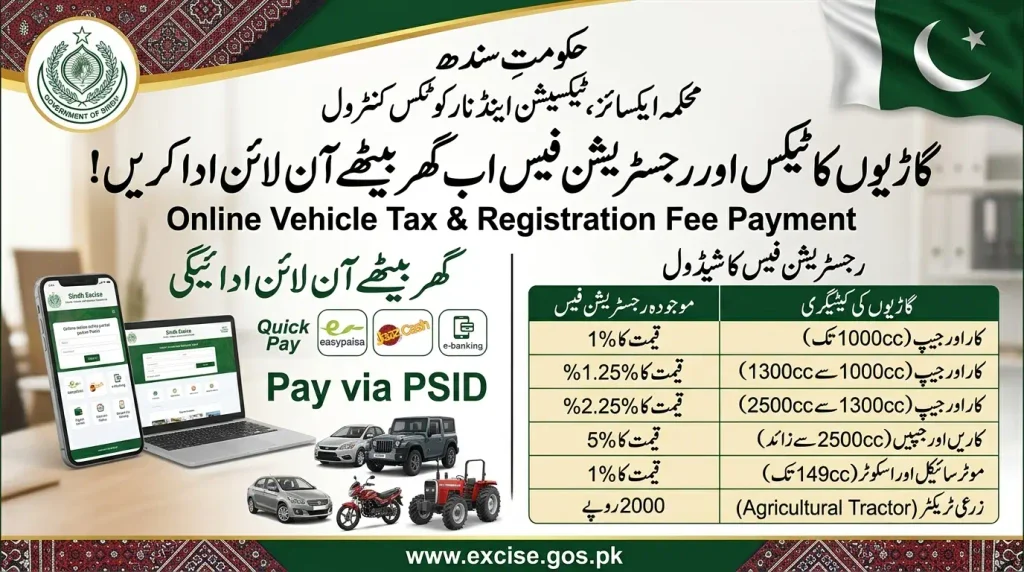
For an estimate based on current vehicle information, use the official Sindh Excise Online Tax Calculator. The calculator itself notes that estimates remain subject to official verification.
Sindh Motor Vehicle Transfer Fee
A vehicle transfer fee becomes relevant when the registered ownership of a vehicle is transferred. The current official Sindh Excise fee schedule lists the following standard categories.
| Vehicle Category | Transfer Fee |
|---|---|
| Motorcycle / Scooter | Rs. 500 |
| Heavy Transport Vehicle | Rs. 4,000 |
| Cars / Jeeps up to 800cc | Rs. 1,600 |
| Cars / Jeeps 801cc to 1500cc | Rs. 2,000 |
| Cars / Jeeps 1501cc to 2000cc | Rs. 3,000 |
| Cars / Jeeps 2001cc to 3000cc | Rs. 5,000 |
| Cars / Jeeps above 3000cc | Rs. 7,000 |
| Rickshaw | Rs. 800 |
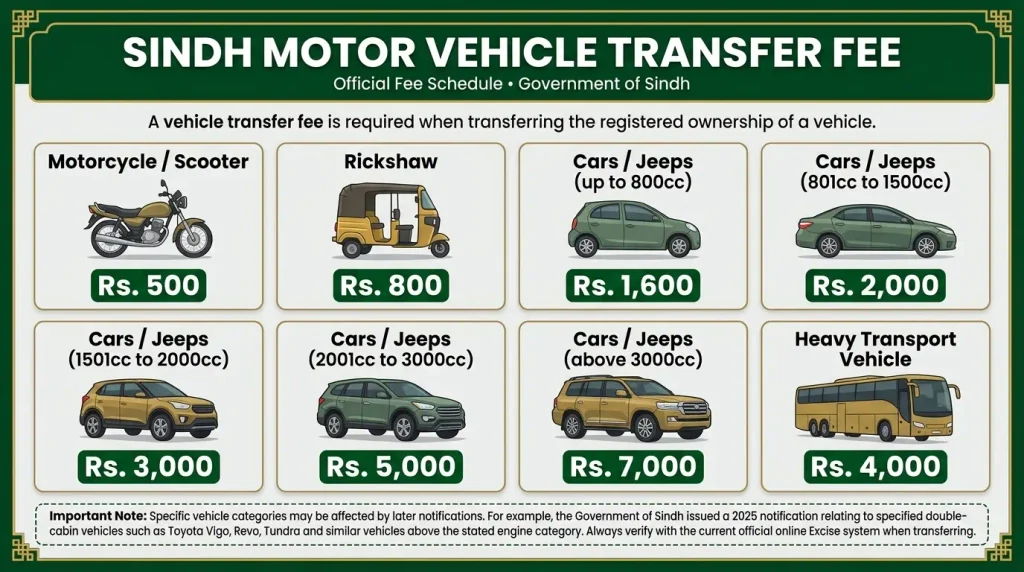
Specific vehicle categories may be affected by later notifications. For example, the Government of Sindh issued a 2025 notification relating to specified double-cabin vehicles such as Toyota Vigo, Revo, Tundra and similar vehicles above the stated engine category. Always use the amount calculated by the current official system when actually completing a transfer.
Sindh Motor Vehicle Tax Rates
The official Sindh Excise Motor Vehicle Tax page publishes several vehicle-tax categories. Some vehicle classes use lifetime or once-for-all tax structures, while other categories can be assessed differently. The following examples come from the currently published Sindh Excise schedule.
| Vehicle Category | Published Motor Vehicle Tax |
|---|---|
| New Motorcycle / Scooter up to 149cc | Rs. 1,800 once for all |
| New Motorcycle / Scooter 150cc and above | Rs. 3,000 once for all |
| Already registered motorcycle under 5 years from first registration | Rs. 600 once for all OR Rs. 80 per annum |
| Already registered motorcycle completed 5 but not 10 years | Rs. 300 once for all OR Rs. 80 per annum |
| Already registered motorcycle completed 10 but not 15 years | Rs. 100 once for all OR Rs. 80 per annum |
| Non-commercial Car / Jeep up to 1000cc, not already registered | Rs. 20,000 once for all |
| Eligible already registered non-commercial Car / Jeep up to 1000cc in published 3-to-5-year category | Rs. 15,000 |
Do not treat this small table as a complete calculator for every vehicle in Sindh. Commercial vehicles, larger-engine vehicles and other categories can have different liabilities and related charges. The official calculation displayed against your actual vehicle should take priority over a generic article table.
This is particularly important in 2026 because government notifications and tax schedules can change. Before payment, review the current amount displayed by the official Sindh Excise portal.
How to Make Sindh Vehicle Tax Online Payment
The easiest sindh vehicle tax online payment route for many vehicle owners is the official Quick Pay service. Sindh Excise describes Quick Pay as a fast and easy method designed to speed up Motor Vehicle Tax payment, and an account is not required to begin using it.
Open the official Sindh Excise Quick Pay portal. Select the appropriate vehicle category, enter the required mobile number and registration number, complete the captcha and retrieve the vehicle details.
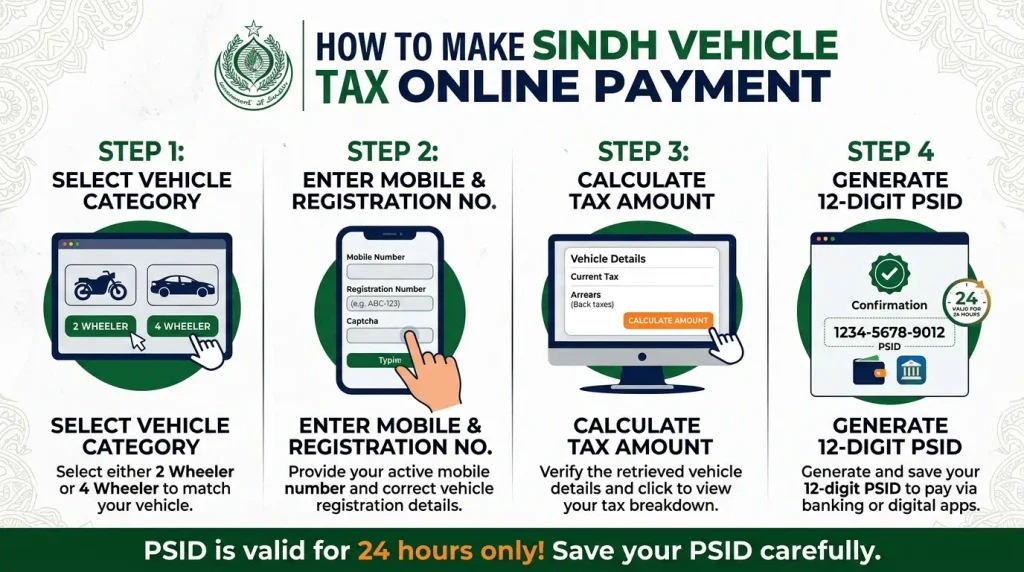
After confirming that the correct vehicle record has been returned, use the Calculate Amount option. The portal can display the relevant heads, arrears where applicable and current tax information. Review the information before generating the payment reference.
When you are satisfied that the vehicle and amount are correct, generate the PSID. This PSID is the payment reference used with the supported banking and digital payment channels.
Step 1: Select 2 Wheeler or 4 Wheeler
The current Quick Pay form begins with 4 Wheeler and 2 Wheeler options. Choose the category that matches the vehicle whose tax you want to pay.
Selecting the correct category is important because the system uses the submitted information to locate the corresponding motor vehicle record. Do not select a different category simply because your first search does not return the expected vehicle.
Step 2: Enter Mobile and Registration Number
Enter a mobile number you can access because the department uses the registered mobile number for payment-related confirmation. Then enter the vehicle registration number in the format requested by the portal.
Check every letter and digit carefully. A wrong registration number can lead to a failed search or, more seriously, a payment attempt against the wrong vehicle record.
Step 3: Calculate the Tax Amount
After retrieving the correct vehicle, use the Calculate Amount option. The Quick Pay system can display the available current tax and arrears information associated with that vehicle.
Review the amount before proceeding. If the record appears incorrect, do not generate and pay a reference simply because the portal allows you to continue. Clarify the vehicle record through the official department where necessary.
Step 4: Generate the 12-Digit PSID
Sindh Excise currently defines its Motor Vehicle Tax PSID as a unique 12-digit code generated against the selected vehicle for payment.
The official FAQ currently states that the PSID remains valid for the next 24 hours after generation. If multiple PSIDs are generated for the same vehicle, the most recent PSID is treated as valid.
Save the PSID carefully and use only the payment reference generated by the genuine Sindh Excise system.
Sindh Vehicle Tax Online Payment Methods
After generating the PSID, users can complete sindh vehicle tax online payment through payment channels supported by the Sindh Excise system and 1Bill.
The official Quick Pay instructions currently describe ATM, internet banking, mobile banking, branchless banking and over-the-counter payment. The newer Pay Online interface also displays digital payment options such as debit or credit card, EasyPaisa and JazzCash, and account transfer where available.
Payment menus can differ between financial institutions, so follow the interface of your own bank or payment provider. For 1Bill payments, look for the appropriate 1Bill Invoice or Voucher payment option and enter the Sindh Excise PSID.
The official Sindh Excise Pay Online / Search PSID service can also be used to search an eligible PSID and view currently offered online payment choices.
ATM and Mobile Banking
For a 1Bill payment, open the Bill Payments or Payments section of the supported bank interface and select the 1Bill Invoice or Voucher payment option. Enter the 12-digit PSID and review the information fetched against that reference.
Do not confirm payment if the displayed government-payment details clearly do not match the transaction you intended to complete.
EasyPaisa, JazzCash and Branchless Channels
Sindh Excise’s official FAQ describes branchless payment through services connected with 1Bill and specifically references EasyPaisa and JazzCash in its payment guidance.
The payment method displayed inside an app can change over time, so use the current official bill-payment route. Never send the amount to a personal wallet number sent by an unknown person claiming to be an Excise agent.
ePayment GOS App and Registered Account
Sindh Excise also provides account-based online services. Its official FAQ refers to the mobile application as ePayment GOS and states that it is available for Android and iPhone users through the relevant app stores.
Registered users can add vehicle information and access tax-payment functions through their account. The department also states that users with multiple vehicles can add multiple vehicles to the same account.
Quick Pay is different because registration is not required for that faster payment route. This makes Quick Pay useful when a vehicle owner simply wants to calculate an eligible Motor Vehicle Tax amount, generate a PSID and complete the payment.
Whether you use a registered account or Quick Pay, always access the service from the official Government of Sindh Excise Tax Portal.
How to Check Sindh Vehicle Tax Payment Status
After completing sindh vehicle tax online payment, checking whether the transaction was successful is an important final step. Sindh Excise currently states in its official FAQ that Motor Vehicle Tax updates in real time after a successful transaction from the consumer end.
Start by checking the payment result shown by your bank, ATM, wallet or online payment provider. A successful transaction should be distinguished from a pending, reversed or failed transaction.
For account-based payments, Sindh Excise states that the paid challan can be downloaded through the Print Paid Challan or Tax Payment History option. This provides a government-side record of the successful tax payment.
For Quick Pay, the official FAQ says the paid challan can be downloaded through the link received in the confirmation SMS after a successful transaction. Save that challan together with your financial transaction receipt.
Check Vehicle Record Online
Sindh Excise also provides an Official Online Vehicle Verification service. Users can select Four Wheelers or Two Wheelers and search the vehicle using its registration number.
Use this government service when you need to verify the vehicle record itself. For payment proof, the paid challan and transaction history remain particularly important.
How to Reprint a Paid Sindh Vehicle Tax Challan
If you paid the tax successfully but later lost the challan, Sindh Excise currently provides a dedicated Re-Print Challan facility.
The current reprint form asks the user to select 4 Wheeler or 2 Wheeler, enter the vehicle registration number, enter the Challan Paid Date and complete the captcha.
This is useful when the original Quick Pay confirmation link is no longer easy to access or the previously downloaded challan has been lost.
Do not make a second tax payment merely because you cannot find the original PDF. First confirm the previous transaction and use the official reprint process to recover the eligible paid challan.
Current Penalties for Late Sindh Vehicle Tax
The old article used general statements about penalties. Current Sindh law is more specific. A 2025 published amendment introduced engine-capacity-based default penalties with maximum caps for motor vehicles, along with separate rates for motorcycles and certain public-transport categories.
| Vehicle / Engine Category | Default Penalty | Maximum Cap |
|---|---|---|
| Up to 1000cc | Rs. 200 per day | Rs. 20,000 |
| 1001cc to 1300cc | Rs. 300 per day | Rs. 40,000 |
| 1301cc to 2000cc | Rs. 400 per day | Rs. 50,000 |
| 2001cc to 2500cc | Rs. 500 per day | Rs. 75,000 |
| 2501cc to 3000cc | Rs. 1,000 per day | Rs. 150,000 |
| 3001cc and above | Rs. 2,000 per day | Rs. 250,000 |
| Motorcycle / Scooter / EV Scooter, where applicable after the stated default period | Rs. 50 per day | Rs. 10,000 |
| Rickshaw / Public Transport, where applicable after the stated default period | Rs. 100 per day | Rs. 20,000 |
These default penalties should not be confused with late-registration penalties for a newly purchased vehicle. Sindh Excise separately publishes late-registration charges based on the period between the invoice or import documentation and registration.
Because penalties can materially increase the amount payable, use the official tax calculation associated with your own vehicle instead of manually calculating a final liability from an article.
Benefits of Sindh Vehicle Tax Online Payment
Online payment can reduce the need to visit a physical office merely to generate a tax payment reference or complete an eligible digital transaction. Vehicle owners can access the government portal using a phone or computer with an internet connection.
Quick Pay is particularly convenient because Sindh Excise states that account registration is not required. A user can start by providing the requested mobile and vehicle information, retrieve the vehicle, calculate the amount and generate a PSID.
Digital payment also provides a clearer transaction trail. A successful transaction can be supported by the payment-provider receipt, Excise confirmation and paid challan.
The official FAQ states that Motor Vehicle Tax updates in real time after a successful consumer transaction. This is a major advantage compared with relying only on a paper submission that may be harder for the vehicle owner to monitor independently.
Finally, digital records make it easier to retrieve payment proof later. Quick Pay users can receive a paid-challan link through the confirmation SMS, while the separate Re-Print Challan facility provides another retrieval option.
Payment Successful but Tax Status Not Updated
If your financial service shows a successful payment but you cannot immediately confirm the expected vehicle-tax position, do not rush into another payment.
First review the payment transaction. Check the 12-digit PSID, amount, date, transaction reference and vehicle registration number associated with the payment.
Next, check whether a confirmation SMS or paid challan is available. For account-based payments, review the Tax Payment History or Print Paid Challan area. For Quick Pay, check the confirmation SMS link.
If you have clear evidence of a successful transaction but the government record does not appear as expected, preserve all evidence and use Sindh Excise’s official assistance channels. Duplicate payment should not be your first solution.
Do Not Pay the Same PSID Twice
A missing screen update or missing PDF does not automatically mean the first transaction failed. Check the bank or wallet result and official payment history before attempting another transaction.
If multiple PSIDs were generated, remember that Sindh Excise currently states that the most recent PSID is valid for the same vehicle.
Common Sindh Vehicle Tax Online Payment Problems
One common problem is entering the vehicle registration number incorrectly. Always compare the number with the official registration record before generating a payment reference.
Another issue is selecting the wrong vehicle category. A motorcycle should be searched under the correct two-wheeler option and an applicable car under the four-wheeler option.
An expired PSID can also cause confusion. The official Sindh Excise FAQ currently gives the PSID a 24-hour validity period. If the reference has expired, return to the official service and follow its current process instead of trying to force an old reference through another payment system.
Users can also confuse PSID generation with successful payment. Generating a PSID creates a payment reference; it does not by itself mean that Motor Vehicle Tax has been paid.
Finally, avoid using old tax screenshots and unofficial calculators as the final amount. The official system should calculate the liability associated with the current vehicle record.
How to Pay Sindh Vehicle Tax Safely
Use the official Sindh Excise website and tax portal whenever you need to calculate or pay Motor Vehicle Tax. A website can use government-style colors or copy the words “Sindh Excise” without actually being an official service.
Never share your ATM PIN, banking password, card CVV or OTP with someone who claims to be an Excise agent. These credentials are private and should remain under your control.
If an SMS or WhatsApp message provides a tax-payment link, open the government portal independently rather than trusting the message. Verify the vehicle and tax amount through the official system before paying.
Keep the PSID, transaction receipt, paid challan and confirmation message after payment. These records can help if you later need to verify the transaction or recover a challan.
Sindh Vehicle Tax Online Payment FAQs
Final Thoughts
Sindh vehicle tax online payment provides vehicle owners with an official digital route for calculating Motor Vehicle Tax, generating a payment reference and completing eligible government payments without relying only on physical office visits.
The easiest route for many users is Sindh Excise Quick Pay. Select the correct vehicle category, enter the mobile and registration details, retrieve the vehicle, calculate the amount and generate the current 12-digit PSID. The department presently states that this PSID is valid for 24 hours and that the latest reference is valid if more than one PSID is generated for the same vehicle.
Payment can be completed through supported 1Bill and digital channels. After a successful transaction, keep the PSID, bank or wallet receipt and paid challan. Sindh Excise states that Motor Vehicle Tax updates in real time after a successful consumer transaction, while Quick Pay users can receive a paid-challan link through the confirmation SMS.
If the challan is later lost, use the official Re-Print Challan service instead of making another payment. For vehicle-tax amounts, penalties and other charges, always give priority to the current amount calculated by Sindh Excise. For more independent Pakistan vehicle and challan guides, visit EChallanChecker.online.